Generators · explainer
What Is a QR Code and How Does It Work?
Learn how QR codes store data, how scanners read them, why error correction and borders matter, and what a QR code reveals about privacy.
Quick answer
A QR code stores data in a grid of small squares. A reader locates the grid, recovers its encoded bits, corrects recoverable errors, and interprets the result as text, a URL, or another supported format. Reading the image and opening a linked website are separate steps.
Point a phone at a QR code and it may offer to open a website, join a Wi-Fi network, or save a contact. The same kind of square image supports all these actions because it carries data that the scanning app knows how to interpret.
Understanding that process helps explain several everyday questions: why some codes look denser than others, why a logo can make a code harder to scan, and why a Wi-Fi QR image should be treated like the password it contains.
What a QR Code Stores
A QR code is a two-dimensional barcode: information is arranged across a grid rather than only along a row of bars. QR stands for Quick Response. DENSO WAVE developed it in 1994. Its small squares are called modules; the grid combines encoded data with patterns that help readers locate and interpret it. This article describes the familiar square QR format with three large corner markers. DENSO WAVE's introduction explains its origins and main features.
The encoded content, often called the payload, determines what a compatible scanner offers to do:
| Payload example | What a compatible app can offer |
|---|---|
Hello from the workshop | Display text |
https://example.com/manual | Open a web address |
tel:+12025550123 | Open the dialer with a number |
WIFI:T:WPA;S:Guest;P:example-password;; | Configure a Wi-Fi connection |
These actions depend on conventions such as URL schemes and the Wi-Fi field format. The QR symbol itself does not send a message, place a call, or establish a connection. The reader interprets the recovered content and hands it to the relevant app. The ZXing project's own wiki documents these payload formats.
How Data Becomes a Pattern
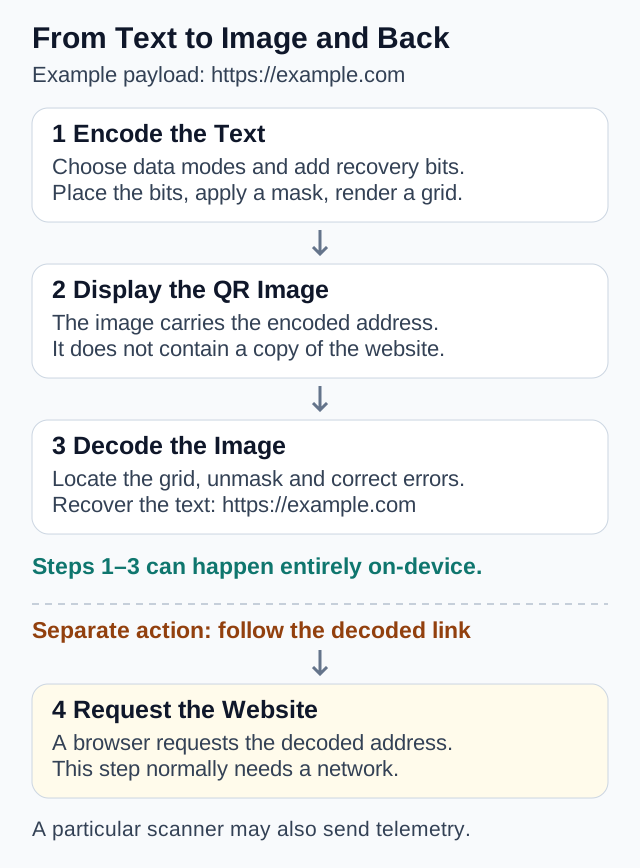
A generator does more than turn each letter into a little square. The process has several stages:
- Encode the content. Numeric, alphanumeric, and byte modes represent different kinds of input efficiently. One symbol can use multiple segments.
- Choose a grid and add recovery data. The generator selects a symbol size that fits the content and error correction level, then calculates additional error correction bytes.
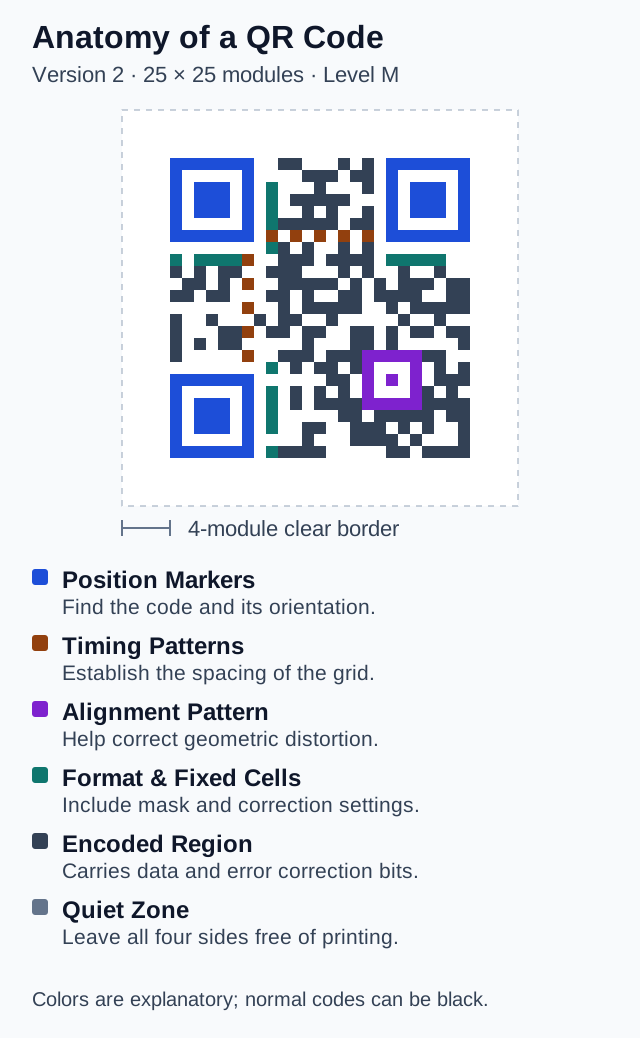
- Arrange the bits. Data and recovery bytes are placed around reserved patterns. A data mask flips selected modules in the encoding region to avoid patterns that are difficult to read; it leaves the position, timing, and alignment patterns unchanged. Format information identifies the mask and correction level.
- Render the image. The completed grid becomes pixels or vector shapes, with a clear border around it.
For a concrete implementation of these steps, see the encoder source in node-qrcode's official repository. Masking is reversible formatting, not a secret key or an encryption step.
 Open Full Size
How a Scanner Reads It Back
The three large corner patterns help a reader locate the symbol and determine its orientation. Timing patterns help establish the module spacing, while alignment patterns in larger symbols help with geometric correction. DENSO's official explanation illustrates these structural elements.
 Open Full Size
The reader samples the grid from the camera image, reads its format information, reverses the mask, and reconstructs the data. Error correction can recover some damaged data before the payload is interpreted. You can follow a working implementation in jsQR's official repository.
Decoding an image can happen entirely on the device. Opening a decoded web address is a separate operation that normally requires a network request. A website QR code usually stores the address, not a copy of the website. Whether a particular scanner also sends images or telemetry elsewhere depends on that scanner's implementation.
Why Some Codes Are Denser
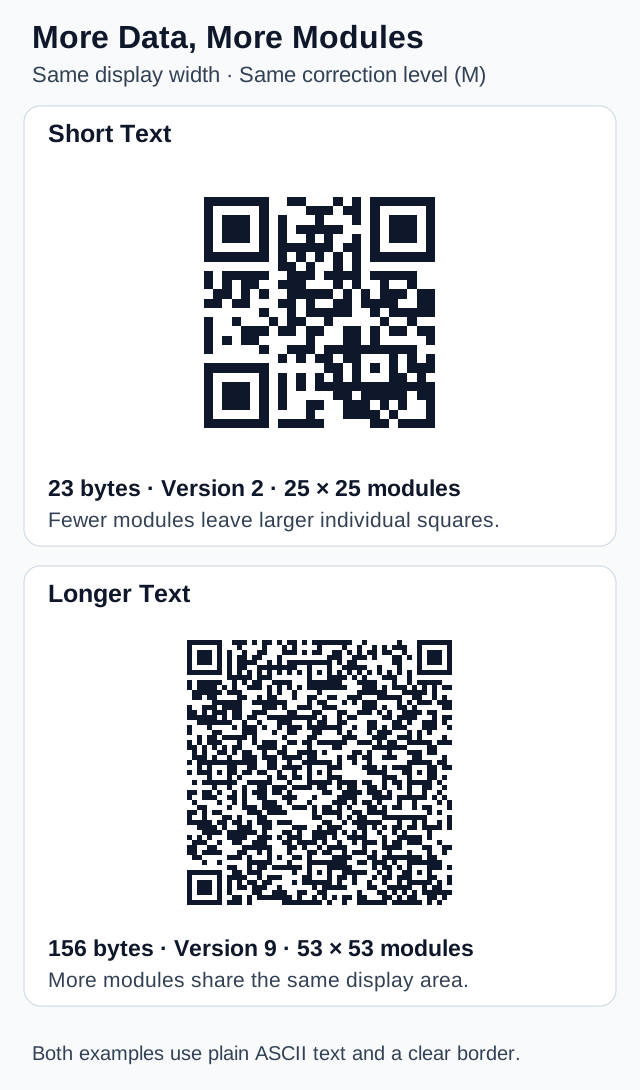
Standard QR symbols range from 21 × 21 modules at Version 1 to 177 × 177 modules at Version 40. Each version adds four modules to each side. Capacity depends on the content, encoding mode, and error correction level. These dimensions and tradeoffs are documented in DENSO WAVE's version guide.
This explains why adding a long query string or more contact fields can produce a denser code. Unicode text can also require several bytes per character. Character count alone does not tell you how much space the payload needs.
 Open Full Size
The short example contains Hello from the workshop. The longer one contains Hello from the workshop. Bring a notebook and a laptop. We will compare QR payloads, inspect the encoded text, and scan each exported image before printing. You can reproduce the comparison with these inputs and correction level M.
If two symbols are printed at the same physical width, the denser one has smaller individual modules. A larger exported image cannot compensate for printing those modules too small for the intended camera and distance. Shorten unnecessary content or give the symbol more physical space.
What Error Correction Can and Cannot Fix
QR codes use Reed–Solomon error correction: additional mathematical information helps recover damaged data. Levels L, M, Q, and H provide different amounts of recovery capability. Higher correction also consumes capacity, potentially requiring a larger grid for the same payload. DENSO WAVE describes the mechanism and tradeoffs.
The often-quoted recovery percentages refer to codewords, not permission to cover that percentage of the image anywhere you like. Damage to a positioning pattern can prevent a reader from finding the grid at all.
A logo deliberately covers part of the symbol. Higher correction may help, but it does not guarantee success. Keep the logo modest and test the final exported or printed result. A successful software decode checks that image under those conditions; it cannot reproduce every phone camera, reflection, or printing defect.
The clear border has a different job: it separates the symbol from its surroundings. Standard QR codes require a quiet zone at least four modules wide on every side. Cropping it away or placing nearby text inside it can interfere with detection. DENSO WAVE's sizing guide explains this requirement.
What the Image Reveals About Privacy
Encoding ordinary text or credentials as a QR image does not make them confidential. In the common WIFI: format shown above, the payload contains the network name and any supplied password; open networks can omit the password. A contact payload contains the supplied contact details. A decoder can expose those values even when its usual interface offers only a convenient action. The ZXing Wi-Fi format documentation describes these fields and the no-password option.
Likewise, an attractive QR image does not authenticate the website behind it. Inspect the recovered address before continuing. A code can be perfectly readable while pointing somewhere you did not intend to visit.
For a generator, distinguish the data it encodes from any data it sends over the network. Our guide to inspecting website requests explains how to examine the latter. A local processing claim can be checked independently of whether the resulting QR code scans.
Try the Encoding and Decoding Steps Yourself
Use a short, non-sensitive example to make the process visible:
- Open the QR Code Generator, choose Text, and enter
Hello from the workshop. - Expand Encoded Content. It should show exactly those words. Download the PNG and open it on a second screen or print it.
- Read it with an app that supports plain-text QR codes. Compare the recovered text with your input; you do not need to open a website to read this payload.
- Change the type to Website URL and enter
https://example.com/manual. The recovered payload is now an address. Opening that address is the next step, separate from decoding; whether the page exists is also a separate question.
The generator's local scan check compares the generated image's decoded payload with the input. That checks the encoding round trip. Testing the downloaded image on the intended device checks a different part of the process: whether the final presentation works for the person who will scan it.
Frequently asked questions
Does a QR code contain the website itself?
A website QR code normally contains a URL. The scanner recovers that address from the image; the browser then requests the website separately.
Can a QR code be read without internet access?
A reader that processes images locally can decode a QR code without internet access. Opening a website or using a network service named in the code may still require a connection.
Does a QR code encrypt my Wi-Fi password?
No. In the common WIFI format shown here, a supplied password is readable by anyone with the image and a suitable decoder. A code for an open network can omit the password.
Sources
- What Is a QR Code? — DENSO WAVE
- QR Code Technology and Structure — DENSO
- Information Capacity and Versions — DENSO WAVE
- Error Correction Feature — DENSO WAVE
- Securing the Quiet Zone — DENSO WAVE
- QR Encoding Implementation — node-qrcode Official Repository
- QR Image Decoding — jsQR Official Repository
- Barcode Contents — ZXing Project Wiki
Related guides
How-to
How to See What Data a Website Sends
Use Chrome or Edge DevTools to see what data a website sends. Real screenshots explain file uploads, request payloads, and form data sent before submission.
Read guideHow-to
How to Create a Memorable Passphrase
Create a memorable passphrase from random words, generated locally in your browser. Learn how word count, capitalization, and separators affect strength.
Read guideHow-to
How to Create a Strong Password
Learn what actually makes a password strong—length, randomness, and uniqueness—and generate one locally with the LeetTools Password Generator.
Read guideHow-to
How to Choose a Username That Doesn't Link Your Accounts
Choose a username that keeps your accounts separate. Learn how names, birth years, and repeated handles reveal identity, and generate random ones locally.
Read guide