Generators · how to
How to Create a Memorable Passphrase
Create a memorable passphrase from random words, generated locally in your browser. Learn how word count, capitalization, and separators affect strength.
Quick answer
Use the LeetTools Passphrase Generator with 5–6 random words, capitalize each word, and add a number or digit separator. The result is easier to remember than a random character string while keeping enough entropy for a credential a human has to type.
The problem with a random password is the opposite of its strength: the more random it is, the harder it is to remember. The classic answer, popularized by the xkcd "Password Strength" comic, is to build the credential from several random words instead of one random character string. Four ordinary words are easier to type and recall than a 16-character jumble, while still creating a search space large enough to resist guessing.
The LeetTools Passphrase Generator does exactly that locally in your browser. It picks random words from a built-in list of 2,434 common English words, then applies the separator, capitalization, and number options you choose. Open it, set 5 or 6 words, and generate.
Passphrase vs password: when to use which
Both approaches are valid; they solve different problems.
| Situation | Better choice |
|---|---|
| Account stored in a password manager | Random character password (16+ characters) |
| Master password, vault unlock, local device login | Passphrase |
| Recovery phrase you may need without a manager | Passphrase |
| An online form with strict character rules | Random character password tuned to the form |
A passphrase trades some entropy for memorability. A random 16-character password from a 90-character pool has roughly 100 bits of entropy; a 4-word passphrase from a 2,434-word list has about 45 bits. That is why the practical rule is: use a random character password where a manager stores it, and reserve passphrases for credentials a human genuinely needs to type from memory—then give those passphrases enough words.
How a random passphrase gets its strength
Each word in the list contributes the same amount of uncertainty: log₂(2,434), about 11.25 bits. Multiply by the number of words. A separately generated trailing digit adds about 3.32 bits; fixed capitalization adds no entropy. These estimates use a fixed separator such as a hyphen or space:
| Words | Base entropy | With an independent trailing digit |
|---|---|---|
| 3 | ~34 bits | ~37 bits |
| 4 | ~45 bits | ~48 bits |
| 5 | ~56 bits | ~60 bits |
| 6 | ~67 bits | ~71 bits |
Each word is drawn at random from that fixed list with the browser's cryptographically secure random source. The draw does not use your name, birthday, or other personal details. The list is ordinary English, so some entries are also names, such as ruth and satoshi, and some are also calendar words, such as march and august. Because the combination is random, an attacker cannot predict the phrase from any single word.
Generate a memorable passphrase
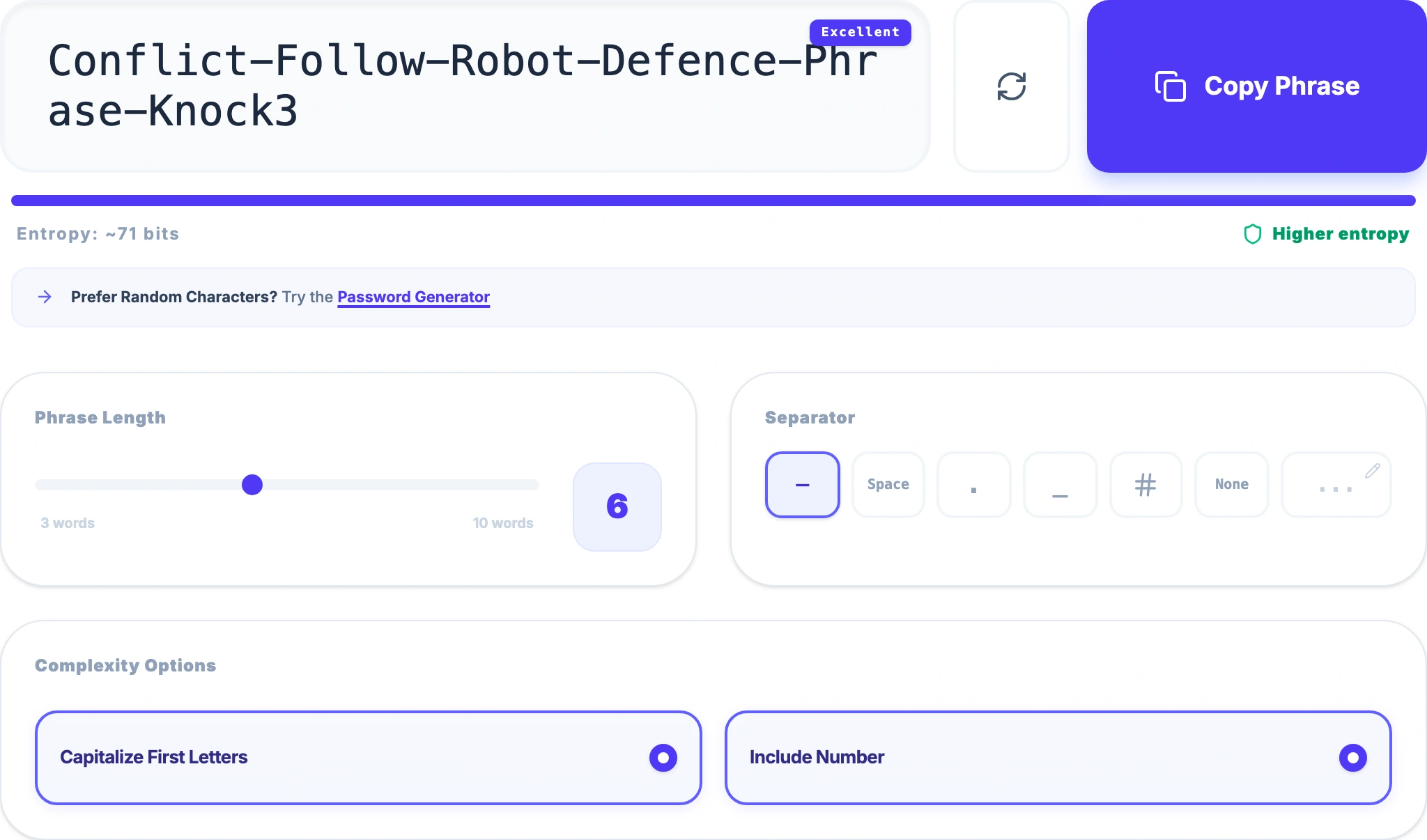
- Open the LeetTools Passphrase Generator.
- Set Words to 5 or 6. Four is the classic minimum; five or six give a more comfortable margin.
- Choose a separator. A hyphen or a space keeps the phrase easy to read. The digit separator inserts a random number between words, which adds entropy without hurting memorability much.
- Turn on Capitalize so each word starts with an uppercase letter (makes the phrase easier to scan but does not add entropy).
- Optionally enable Add a number for an extra random digit.
- Generate, review the phrase, and copy it.
 Open Full Size
Make it stronger without making it unmemorable
The easiest way to strengthen a passphrase is more words, not more tricks. Going from 4 to 5 words adds about 11 bits of entropy while staying easy to type. An independently generated trailing digit adds about 3.3 bits of entropy. The one option that costs more than it is worth is a long random separator, because it makes the phrase harder to type without meaningfully increasing the search space.
What to avoid
- Published examples. Any phrase that appears in an article or comic, including this one, is already in word lists. Always generate a fresh random combination.
- Personal information. A phrase built from your pet, street, or birth year is guessable by people who know you and by data brokers. The generator does not take those details as input. It still draws from a fixed list that includes some name-like and calendar words.
- Short passphrases with common words. Three words (about 34 bits) is weak for anything important. Keep the count at five or six for credentials that matter.
Where a passphrase fits
Use a passphrase for the credentials you genuinely need to remember: a password manager's master password, device or vault unlock, and recovery phrases. For everything else—shopping sites, work accounts, developer dashboards—a random character password stored in the manager is the stronger default. The Password Generator covers that half of the workflow, and the guide to creating a strong password explains the reasoning.
Local generation
The words are selected and combined in the browser on your device. The phrase is never sent to LeetTools or any server; nothing you generate is uploaded so it can be created. As with any page, the website itself loads its own resources, but the passphrase generation happens locally.
Check your passphrase before relying on it
- Confirm the word count is 5 or 6 (or the highest number you can comfortably type).
- Read the phrase. Reject a result that uses your own name, a date that matters to you, or other personal details. The word list can still supply a word that is also a name.
- Type it once to confirm you can reproduce it without looking.
- Store a copy somewhere safe if forgetting it would lock you out.
- Do not reuse the same passphrase for multiple services.
If the credential lives in a password manager and never needs to be typed from memory, a longer random character password is the stronger choice—switch to the password generator for that case.
Frequently asked questions
Is a passphrase or a password more secure?
Security depends on entropy, not on the label. A random 16-character password from a large pool is roughly 100 bits of entropy, while a 4-word passphrase from a 2,434-word list is about 45 bits. Five or six words with a fixed separator and an independently generated trailing digit give roughly 60–71 bits, which is strong enough for many credentials a human must remember. Use a random character password for accounts stored in a password manager, and a longer passphrase when you must type the credential from memory.
How many words should a passphrase have?
Four random words is the classic minimum, about 45 bits of entropy with this tool's word list. Five words (about 56 bits) or six words (about 67 bits) are more comfortable margins, even without additional random digits.
Are generated passphrases uploaded anywhere?
No. The words are picked randomly in the browser and the phrase is assembled locally. The generated text is not sent to LeetTools or any server.
Is "correct horse battery staple" a good passphrase?
Not anymore as a literal phrase—it is the most famous example from the xkcd comic, so attackers' word lists know it. The point is the method: pick several random words so the combination is new. The generator does that for you every time.
Sources
Related guides
How-to
Passphrase vs Password: Which Should You Use?
Compare passphrases and passwords by entropy, memorability, and where each fits. Decide based on how the credential will be stored and typed.
Read guideHow-to
How to Create a Strong Password
Learn what actually makes a password strong—length, randomness, and uniqueness—and generate one locally with the LeetTools Password Generator.
Read guideHow-to
How to Choose a Username That Doesn't Link Your Accounts
Choose a username that keeps your accounts separate. Learn how names, birth years, and repeated handles reveal identity, and generate random ones locally.
Read guideExplainer
What Is a QR Code and How Does It Work?
Learn how QR codes store data, how scanners read them, why error correction and borders matter, and what a QR code reveals about privacy.
Read guide