Network · how to
How to Share a HAR File Without Leaking Tokens
Chrome’s default HAR export already drops Cookie and Authorization. Query tokens such as access_token and password fields in JSON can remain. Compare Chrome, Firefox, and a local sanitizer.
Quick answer
Chrome and Edge default HAR exports already drop Cookie, Set-Cookie, and Authorization. Query tokens such as access_token and token or password fields in request or response JSON can remain. Use the LeetTools HAR Sanitizer when the capture may include those fields, or when the file came from Firefox or Chrome’s sensitive export.
A HAR file is a JSON log of browser network activity. Support teams ask for one because it shows failed logins, redirects, and API errors. The same file can also hold a live session.
Chrome and Edge no longer put Cookie, Set-Cookie, or Authorization into a default export. That change does not empty the file. Query parameters such as access_token, and JSON fields named password or refresh_token, can still be present. Firefox Save All as HAR does not apply Chrome’s default strip.
For a capture that may include those leftover fields, the LeetTools HAR Sanitizer redacts matching names in this browser tab and downloads a cleaned HAR.
What Chrome already removes
From Chromium 130, DevTools defaults to Export HAR (sanitized). That export omits:
- the
Cookierequest header; - the
Set-Cookieresponse header; - the
Authorizationheader.
The Network panel setting Allow to generate HAR with sensitive data unlocks Export HAR (with sensitive data). Some vendors still ask for that fuller export because they need cookies to diagnose auth. Auth0’s support docs tell people to enable the setting before exporting.
Default sanitizing is header-scoped. It does not promise to remove:
access_token,id_token, or similar keys on the query string or inrequest.url;password,client_secret, orrefresh_tokenin request or response JSON;- custom headers that are not Cookie or Authorization, such as a vendor
Api-Tokenname.
Choose a sharing method
| Method | Best for | Trade-off |
|---|---|---|
| Chrome or Edge default sanitized export | Ordinary bugs with no tokens in the URL or body | Leaves query tokens and JSON password fields |
| LeetTools HAR Sanitizer | A second pass for query tokens, form passwords, and request or response JSON secrets | Name-based rules; does not redact multipart, XML, or generic keys such as data |
| Firefox Save All as HAR, then sanitize | Firefox was the only browser used to reproduce the bug | Firefox does not strip Cookie or Authorization by default |
| Search and replace in a text editor | One extra vendor-specific field the sanitizer will not match | Easy to miss a second occurrence or break JSON |
Chrome’s default export is enough when you did not enable the sensitive-data setting and the failing request does not put credentials in the query string or a JSON body. Use the sanitizer when support asked for the sensitive export, when you captured in Firefox, or when you can see token or password in the URL or payload.
Option 1: Share Chrome’s default export
- In Chrome, open DevTools with
F12orCmd+Option+I, then open Network. - Check Preserve log, clear the log, and reproduce the issue.
- Export with Export HAR (sanitized). Do not turn on Allow to generate HAR with sensitive data unless support asked for cookies.
Search the saved file for access_token, password, secret, and Authorization. If those strings are absent, the default export may be all you need.
Option 2: Redact leftover query and body fields locally
- Open HAR Sanitizer.
- Choose Open HAR and select the
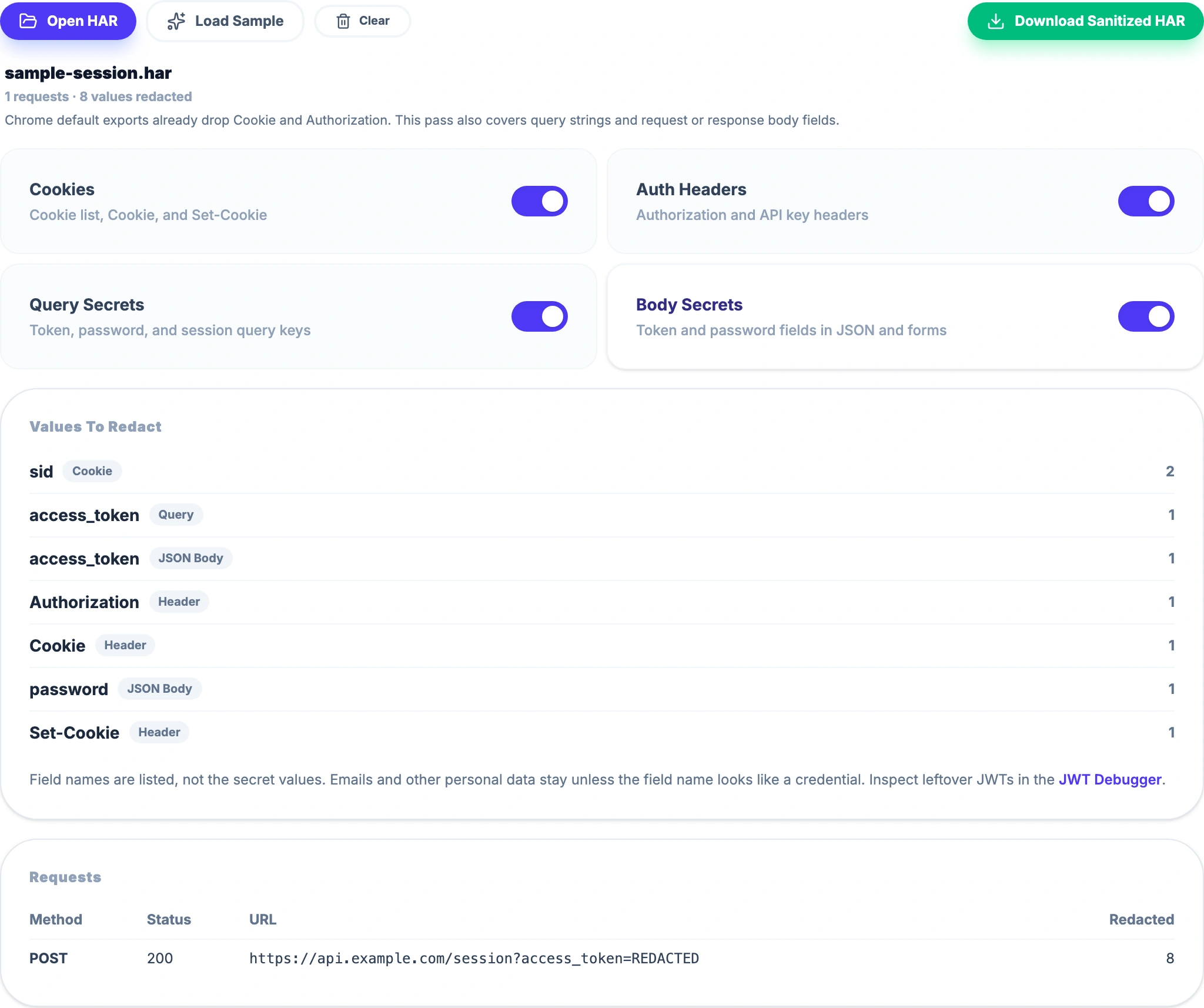
.harfile, or choose Load Sample to see the matching field names on a fake login. - Confirm Query Secrets and Body Secrets are on if the capture might include URL tokens or JSON passwords.
- Leave Cookies and Auth Headers on when the file came from Firefox or from Chrome’s sensitive export.
- Review Values To Redact. The list shows field names, not the secret values.
- Choose Download Sanitized HAR and send that copy.
 Open Full Size
The sanitizer walks HAR fields instead of running regular expressions on the whole file, so the download stays valid JSON. It redacts all cookie values. Headers, query keys, and JSON or form fields are redacted when the name looks like token, secret, session, JWT, password, or Authorization. A leftover JWT in a generic field can be inspected in the JWT Debugger without pasting the original HAR.
What “local” means here
HAR Sanitizer reads the selected file in its browser tab. LeetTools does not receive the capture. The website still loads page resources; local redaction does not mean the site is offline.
Option 3: Edit the HAR as text
Open the file in an editor and replace remaining vendor-specific values only after the structured pass. Keep a copy of the original until support confirms they can work from the redacted file. A missed comma will make the HAR unreadable.
This route is a poor first step. Cookie headers and JSON bodies are easy to only half-edit.
When support asks for a sensitive HAR
Ask whether they need cookies. If they do, enable Chrome’s sensitive export, reproduce once, then run HAR Sanitizer so query tokens and JSON passwords are not sitting next to the cookies they asked for.
Prefer the vendor’s own ticket uploader when it redacts on the client before the file leaves your machine. Email, chat, and generic attachments do not.
Do not treat a redacted HAR as a revocation. If a live token was in an earlier unredacted copy, rotate that credential.
The practical recommendation
Use Chrome’s default sanitized export for ordinary page bugs. Use HAR Sanitizer when the capture may still contain query tokens or JSON passwords, or when the file is a Firefox or sensitive Chrome export. Search the downloaded file for token and password before you send it.
Frequently asked questions
Does Chrome already sanitize HAR files?
Chromium 130 and later default to Export HAR (sanitized), which strips Cookie, Set-Cookie, and Authorization. Query strings and JSON bodies are not part of that default strip.
When is Chrome’s default HAR export enough?
It is enough when you used the default sanitized export and the failing request does not carry tokens in the URL or a JSON/form body. If support asked for Export HAR (with sensitive data), or you captured in Firefox, run another pass.
Are HAR files uploaded to LeetTools?
No. HAR Sanitizer reads the file in the current browser tab. LeetTools does not receive the capture. Loading the website still fetches page resources.
Does this remove every secret in a HAR?
No. It redacts all cookie values, a short list of auth and API-key headers, and query or JSON/form fields whose names look like token, secret, password, session, JWT, or API key. Multipart, XML, path tokens, and generic keys such as data are left as-is.